
n8n v2.0 AI Lead Scoring Workflow with GPT-4o: A Complete Build Guide
Most B2B teams still score leads with a spreadsheet formula or a handful of static rules in their CRM — job title contains “Director,” company size above 50, deal value above a threshold. It works, technically, but it misses everything a rule can’t capture: the tone of an inbound message, the specificity of a request, whether someone sounds like they’re ready to buy or just browsing. That’s exactly the gap an LLM is good at closing, and n8n’s v2.0 release makes it straightforward to wire GPT-4o into your existing lead pipeline without writing a custom backend.
In this guide, we’ll build a complete n8n workflow for automated AI lead scoring with GPT-4o — from the incoming lead trigger through GPT-4o’s analysis to routing high-value leads straight to your sales team. This is the same category of workflow our team at Dynamic Tech World has been setting up for clients running multiple lead sources (contact forms, LinkedIn outreach replies, PeoplePerHour and Upwork inquiries) who need one consistent scoring layer instead of manually triaging every lead by hand.
Table of Contents
Why n8n v2.0 Specifically
If you’ve used n8n before, v2.0 changes a few things that matter for a production lead-scoring workflow specifically:
- Draft vs. Published workflow states — you can now edit and test a live lead-scoring workflow without disrupting the version currently processing real leads. In v1, hitting Save on a workflow you were debugging meant pushing unfinished logic straight to production.
- Task Runners enabled by default — Code nodes now execute in an isolated runner rather than the main process, so a bug in your scoring logic can’t crash the whole n8n instance while it’s actively receiving leads.
- More reliable sub-workflow handling — if your scoring flow calls a sub-workflow (for CRM lookups or Slack approval steps, for example), v2.0 fixed the bug where the parent workflow could receive incorrect results back from a waiting sub-execution.
None of this changes how you’d design the workflow logically, but it does mean a lead-scoring pipeline built on v2.0 is meaningfully more production-safe than the same workflow built on v1.
What This Workflow Actually Does
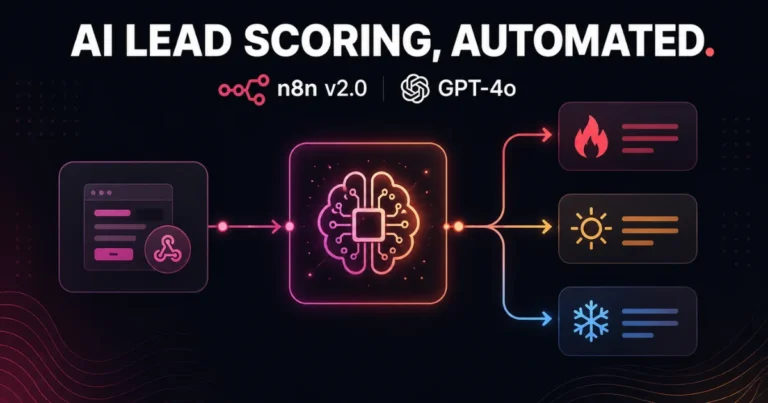
At a high level, the workflow:
- Triggers when a new lead comes in (webhook from a form, or a new-row trigger from Google Sheets/CRM)
- Sends the lead’s information to GPT-4o with a structured scoring prompt
- Parses GPT-4o’s response into a numeric score and a short reasoning summary
- Routes the lead based on score — high-value leads go straight to Slack and your CRM as “hot,” mid-tier leads get logged for follow-up, low-value leads get archived or added to a nurture sequence

Step 1: Set Up the Trigger
Add a Webhook node as your trigger if leads come from a website form (Elementor Pro forms can POST directly to an n8n webhook URL, no extra plugin needed). If leads live in a Google Sheet or CRM instead, use the corresponding Trigger node (Google Sheets Trigger, HubSpot Trigger, or similar) set to fire on new rows or new contacts.
Either way, make sure the incoming data includes at minimum: name, email, company, job title, and whatever free-text field the lead filled in (a message, project description, or inquiry details) — that free-text field is what GPT-4o will actually be scoring against.
Step 2: Normalize the Incoming Data
Add a Set node (or Edit Fields node) right after the trigger to clean up field names and handle missing data gracefully. Lead sources rarely send perfectly consistent field names, so mapping everything into a predictable structure here — leadName, leadEmail, leadCompany, leadMessage — keeps the rest of the workflow simple and makes it easy to swap lead sources later without rebuilding the scoring logic.
Step 3: Add the AI Agent Node with GPT-4o
This is the core of the workflow. Add n8n’s AI Agent node, connect your OpenAI credentials, and select GPT-4o as the model. Rather than a loose prompt, give it a structured system message that forces consistent, parseable output:
Forcing JSON output here matters more than it might seem — it’s what lets the next node parse the response reliably instead of trying to extract a score from unpredictable natural-language phrasing.
Step 4: Parse the GPT-4o Response
Add a Code node immediately after the AI Agent node to parse the returned JSON and attach it to the lead’s data:
Wrap this in a try/catch in production, and route to a fallback path (defaulting to a “needs manual review” tier) if parsing fails — LLMs occasionally add stray text around JSON output even with a strict prompt, and your workflow needs to handle that gracefully rather than erroring out silently.
Step 5: Route Leads with a Switch Node
Add a Switch node keyed on the tier field from Step 4, with three output paths:
- Hot — send an immediate Slack notification to your sales channel and create/update the CRM record with “Hot Lead” status
- Warm — log to a Google Sheet or CRM view for follow-up within 24-48 hours, no immediate alert needed
- Cold — add to a nurture email sequence or simply archive with the score attached for future reference
Step 6: Send the Hot Lead Alert
For the hot-lead path, add a Slack node (or Microsoft Teams, if that’s your team’s tool) posting a message that includes the lead’s name, company, GPT-4o’s reasoning, and the suggested next action — giving your sales team the context they need to act immediately without digging through the CRM first:
Step 7: Publish the Workflow
Once tested against a handful of sample leads with varied intent levels, use n8n v2.0’s Publish action rather than just saving. This is the step that actually deploys your tested logic to production while leaving your draft editable for future iteration — a meaningful improvement over v1, where “Save” and “deploy” were the same action.
Testing and Calibrating the Scoring Prompt
The single biggest factor in whether this workflow actually helps your sales process is prompt calibration, not the n8n plumbing around it. Before trusting it with real leads:
- Run 15-20 historical leads (a mix of ones that converted and ones that didn’t) through the workflow and compare GPT-4o’s scores against what actually happened
- Adjust the system prompt’s criteria if scores don’t align with reality — for example, if it’s over-weighting company size and under-weighting message specificity
- Revisit the prompt periodically as your business shifts focus between client segments; a scoring prompt tuned for e-commerce clients won’t necessarily transfer well if you start prioritizing SaaS clients
Common Mistakes to Avoid
- Trusting the score without a manual spot-check period. Run the workflow in “shadow mode” — scoring leads but not yet acting on the tier automatically — for a couple weeks before letting it drive real routing decisions.
- Not handling malformed JSON responses. Even with a strict prompt, occasionally build in a fallback path so a parsing failure doesn’t silently drop a lead.
- Scoring on too little information. A lead with just a name and email and no message content gives GPT-4o almost nothing to work with — consider requiring a minimum message length on your intake form.
- Ignoring cost at scale. GPT-4o calls add up on high lead volume. Monitor your OpenAI usage and consider batching or caching for near-duplicate inquiries if volume grows significantly.
- Skipping the Draft/Published distinction in v2.0. Editing a workflow that’s actively scoring live leads without using Draft mode risks processing a lead through half-finished logic mid-edit.
Extending the Workflow Further
Once the core scoring pipeline is stable, natural additions include:
- A CRM enrichment step before scoring, pulling in company size or industry data from a tool like Clearbit, so GPT-4o has firmographic context beyond what the lead typed
- A weekly summary node that aggregates scored leads and posts a digest to Slack or email, useful for spotting trends in lead quality by source
- A feedback loop, where sales marks whether a “hot” lead actually converted, feeding that outcome back into periodic prompt refinement
Final Thoughts - n8n v2.0 AI Lead Scoring Workflow (GPT-4o)
Rule-based lead scoring misses too much nuance to be genuinely useful past a basic filtering pass. Wiring GPT-4o into an n8n v2.0 workflow gives you a scoring layer that actually reads and understands what a lead wrote, at a fraction of the cost and complexity of building this as custom software — and v2.0’s Draft/Published states and Task Runner isolation make it safe to keep iterating on the logic without risking your production lead flow.
Want this workflow built and connected to your actual CRM, forms, and Slack — tuned to your specific lead criteria? Get in touch with Dynamic Tech World and we’ll set up the full automation, or explore our portfolio for examples of past automation and web projects.
Frequently Asked Questions
Do I need to be a developer to build this n8n lead scoring workflow?
Most of the workflow is built with n8n’s visual nodes — Webhook, Set, AI Agent, Switch, Slack — with only a small Code node needed to parse GPT-4o’s JSON response. Basic comfort with JavaScript helps for that one step, but the rest requires no coding.
Why use GPT-4o specifically instead of another model?
GPT-4o offers strong reasoning over unstructured text like lead messages at a reasonable cost per call, and n8n’s AI Agent node supports it natively alongside other models like Claude and Gemini, so switching models later mainly means changing a dropdown rather than rebuilding the workflow.
What’s different about building this in n8n v2.0 versus v1?
n8n v2.0 adds Draft vs. Published workflow states, letting you safely test changes to a live lead-scoring workflow without disrupting production, along with Task Runner isolation that prevents a scoring logic bug from affecting the rest of your n8n instance.
How accurate is AI-based lead scoring compared to rule-based scoring?
AI-based scoring can capture qualitative signals like intent and specificity that rule-based systems miss entirely, but accuracy depends heavily on prompt calibration. Testing against historical lead outcomes before full deployment is essential for reliable results.
Can this workflow connect to my existing CRM?
Yes. n8n includes native nodes for most major CRMs (HubSpot, Salesforce, Pipedrive) and can also connect to Google Sheets or Airtable as a lightweight CRM alternative, updating lead records with the score, tier, and reasoning automatically.
What happens if GPT-4o returns an unexpected response format?
A well-built workflow includes error handling in the parsing step, routing any lead with a malformed AI response to a manual-review path rather than letting the workflow fail silently or drop the lead entirely.
Written by Abhay Pathak, Founder of Dynamic Tech World, an ISO 9001:2015 certified digital agency based in New Delhi specializing in WordPress development and AI-powered automation for enterprise clients.

Abhay Pathak
Founder, Dynamic Tech WorldAs a full-stack web developer and AI orchestration specialist based in New Delhi, I help creators and agencies scale their digital assets through automated systems, high-speed development, and advanced prompt engineering.
Launch Your Site
Claim up to 20% OFF Premium Web Hosting + a FREE Domain. Fast & Secure.
Claim DiscountJoin the VIP Club
Get free Elementor Pro updates, premium AI prompts, and daily tech hacks directly on our Telegram.
Join TelegramWork With Us
Need a high-converting website, custom AI workflow, or want to advertise your brand to our global audience?
Contact Agency