
Human-in-the-Loop Slack Bot Architecture in n8n
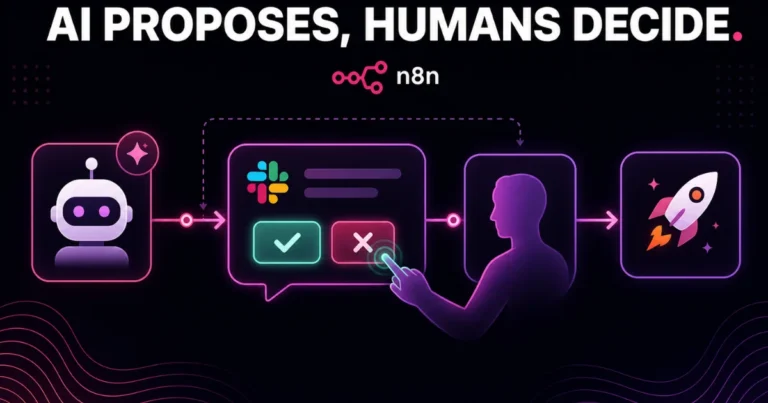
Fully autonomous AI agents make for a great demo and a risky production system. The moment an automated workflow can send a client email, approve a refund, or publish content on its own, someone eventually asks the obvious question: what happens when it gets it wrong? Human-in-the-loop design is the answer — building automation that does the heavy lifting but pauses at the moments that actually matter, waiting for a real person to approve, edit, or reject before anything irreversible happens.
Slack is the natural interface for this, since most teams already live there and a Slack approval button is a far lower-friction checkpoint than logging into a dashboard. In this guide, we’ll walk through how to build a human-in-the-loop Slack approval bot using n8n — the architecture, the specific nodes involved, and the details that separate a bot that feels reliable from one that quietly breaks the moment a workflow runs long or a teammate is offline.
This pattern shows up constantly in the automation work we do at Dynamic Tech World — AI-drafted client replies, content approvals, invoice sign-offs — anywhere a client wants AI speed without giving up final human judgment.
Why Human-in-the-Loop Matters for Production Automation
A fully automated workflow is faster, but it concentrates risk into a single point of failure: whatever logic drove the decision has to be right every single time, with no correction step. Human-in-the-loop design trades a small amount of speed for a meaningful reduction in that risk, and it’s the right default for anything where being wrong is expensive — sending a message on your brand’s behalf, modifying a customer’s account, publishing content, or approving a financial transaction.
The goal isn’t approval on everything. A well-designed human-in-the-loop system routes low-stakes, high-confidence actions straight through automatically, and only pauses for the decisions that genuinely warrant a second set of eyes.
Core Architecture Overview
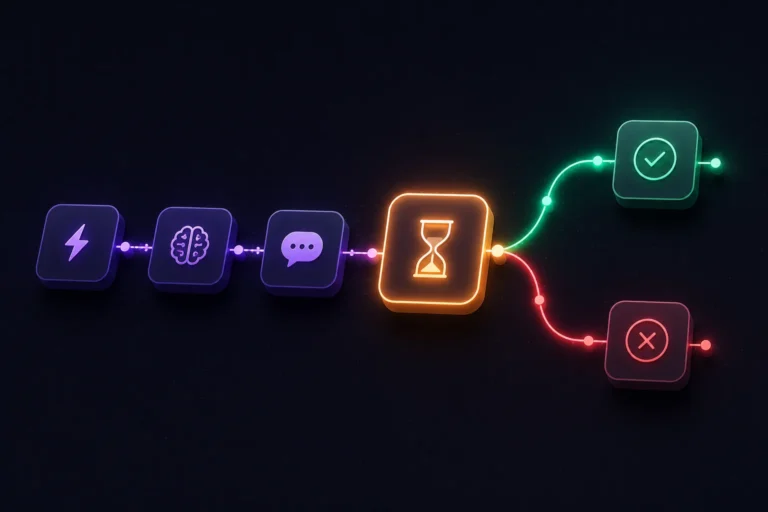
At a structural level, this workflow has five parts:
- A trigger that kicks off the process (a new lead, an AI-drafted response, a flagged transaction)
- An AI or logic step that prepares the action and a confidence/risk assessment
- A Slack message with interactive buttons presenting the proposed action for approval
- A Wait node that pauses execution until someone responds
- A branch that either executes the approved action, cancels it, or routes it back for edits
n8n’s Wait node is what makes step 4 possible without keeping a workflow execution actively running (and consuming resources) while it waits — it can pause for hours or days if needed, resuming only when a Slack response triggers the corresponding webhook.
Table of Contents
Step 1: Trigger and Prepare the Action
Start with whatever triggers the decision in the first place — a new form submission, an AI Agent node drafting a reply, a scheduled check against your CRM. Whatever the source, the output of this stage should be a clear, structured proposal: what action is about to happen, and any supporting context a human would need to approve or reject it quickly.
If an AI step is involved (say, GPT-4o drafting a client reply), have it output both the proposed content and a brief confidence note — this becomes useful context in the Slack message itself, helping the approver gauge how much scrutiny the item actually needs.
Step 2: Send the Approval Request to Slack
Use n8n’s Slack node, set to Send and Wait for Response — this is the node purpose-built for human-in-the-loop patterns, and it’s worth using instead of manually wiring a plain message node plus a separate Wait node, since it handles the button-and-webhook plumbing for you.
Configure the message with:
- Clear context (what’s being proposed, and why)
- The proposed content itself, formatted so it’s readable directly in Slack without needing to click through anywhere
- Two or three action buttons — typically Approve, Reject, and optionally Edit or Needs Changes
Step 3: Configure the Wait Behavior
The Send and Wait for Response node handles pausing natively, but it’s worth deciding explicitly how long the workflow should wait before timing out, and what happens if nobody responds. n8n lets you set a timeout duration and a fallback path for unanswered approvals — route this to a “needs follow-up” state or a reminder message rather than letting time-sensitive items silently expire unnoticed.
This is one of the areas n8n v2.0 specifically improved: previously, a parent workflow waiting on a sub-workflow containing this kind of pause could receive incorrect results once the sub-workflow resumed. That’s fixed in v2.0, which matters if your architecture nests the approval step inside a reusable sub-workflow rather than building it directly into the main flow.
Step 4: Branch on the Response
After the Wait node resumes, add an IF or Switch node keyed on which button was clicked:
- Approve → proceed to execute the action (send the email, publish the content, process the transaction)
- Reject → log the rejection with a reason if you’ve captured one, and stop the workflow, or route it back to the AI step with feedback for a revised attempt
- Edit / Needs Changes → route to a step where the approver’s edited version replaces the original before proceeding, rather than discarding their input
Step 5: Log Every Decision
Regardless of outcome, write the decision, the approver, the timestamp, and the original proposed content to a Google Sheet, Airtable base, or your database of choice. This audit trail matters for two reasons beyond simple record-keeping: it lets you spot patterns in what gets rejected (useful for improving your AI prompts over time), and it gives you a real answer if a client or manager later asks “who approved this.”
Handling Multiple Approvers
For workflows where more than one person could reasonably approve (a small team’s shared Slack channel, for example), build in a race-condition safeguard: once one person clicks a button, immediately update the Slack message to reflect the decision and disable the buttons, so a second approver clicking moments later doesn’t trigger a duplicate action or conflicting branch. n8n’s Slack node handles button-state updates through a follow-up message edit — use this rather than leaving the original buttons live after a decision has already been made.
Handling Escalation
Not every approval request is equally urgent. For time-sensitive items, add a secondary check: if no response arrives within a set window (say, 30 minutes for a customer-facing item), send a follow-up ping to a specific person or escalate to a different channel entirely, rather than letting the item sit indefinitely in a channel someone might not be actively watching.
Common Mistakes to Avoid
- No timeout handling. An approval request that waits forever with no fallback is a silent failure waiting to happen — always define what happens if nobody responds in a reasonable window.
- Leaving buttons active after a decision. Without disabling buttons post-decision, a second click can trigger duplicate processing.
- Skipping the audit log. Even a simple decision log saves significant time during any future review of what the automation actually did and why.
- Routing everything through approval. Over-applying human-in-the-loop to low-stakes, high-confidence actions defeats the purpose of automating in the first place — reserve it for decisions that genuinely carry risk.
- Not giving the approver enough context. A Slack message that just says “Approve this?” with no supporting detail forces the approver to go dig elsewhere, which slows the whole point of using Slack as the interface.
- Building the pause with a manual Wait node when Send and Wait for Response already handles it. Reinventing this pattern manually adds unnecessary complexity when n8n’s dedicated node covers the common case cleanly.
When to Use This Pattern vs. Full Automation
A rough rule of thumb: if being wrong costs more than the time saved by skipping human review, keep a human in the loop. Internal, low-stakes, easily-reversible actions (tagging a lead, updating an internal note) are usually safe to fully automate. Anything customer-facing, financial, or irreversible — sending external communications, processing payments, publishing content under your brand — benefits from at least a lightweight approval step, even if it’s just a quick Slack tap that takes someone five seconds to review.
Handling Multiple Approvers
For workflows where more than one person could reasonably approve (a small team’s shared Slack channel, for example), build in a race-condition safeguard: once one person clicks a button, immediately update the Slack message to reflect the decision and disable the buttons, so a second approver clicking moments later doesn’t trigger a duplicate action or conflicting branch. n8n’s Slack node handles button-state updates through a follow-up message edit — use this rather than leaving the original buttons live after a decision has already been made.
Handling Escalation
Not every approval request is equally urgent. For time-sensitive items, add a secondary check: if no response arrives within a set window (say, 30 minutes for a customer-facing item), send a follow-up ping to a specific person or escalate to a different channel entirely, rather than letting the item sit indefinitely in a channel someone might not be actively watching.
Common Mistakes to Avoid
- No timeout handling. An approval request that waits forever with no fallback is a silent failure waiting to happen — always define what happens if nobody responds in a reasonable window.
- Leaving buttons active after a decision. Without disabling buttons post-decision, a second click can trigger duplicate processing.
- Skipping the audit log. Even a simple decision log saves significant time during any future review of what the automation actually did and why.
- Routing everything through approval. Over-applying human-in-the-loop to low-stakes, high-confidence actions defeats the purpose of automating in the first place — reserve it for decisions that genuinely carry risk.
- Not giving the approver enough context. A Slack message that just says “Approve this?” with no supporting detail forces the approver to go dig elsewhere, which slows the whole point of using Slack as the interface.
- Building the pause with a manual Wait node when Send and Wait for Response already handles it. Reinventing this pattern manually adds unnecessary complexity when n8n’s dedicated node covers the common case cleanly.
When to Use This Pattern vs. Full Automation
A rough rule of thumb: if being wrong costs more than the time saved by skipping human review, keep a human in the loop. Internal, low-stakes, easily-reversible actions (tagging a lead, updating an internal note) are usually safe to fully automate. Anything customer-facing, financial, or irreversible — sending external communications, processing payments, publishing content under your brand — benefits from at least a lightweight approval step, even if it’s just a quick Slack tap that takes someone five seconds to review.

Final Thoughts - Human-in-the-Loop Slack Bot Architecture in n8n
Human-in-the-loop architecture isn’t a compromise on automation — it’s what makes AI-assisted workflows trustworthy enough to actually run in production on anything that matters. n8n’s Send and Wait for Response node, combined with a clear branching structure and a proper audit log, gives you a Slack approval bot that feels genuinely reliable rather than a fragile demo that only works when everything goes right.
Want a human-in-the-loop approval system built into your team’s actual workflows — Slack, CRM, email, or content pipeline? Talk to Dynamic Tech World about your automation needs, or check our portfolio for examples of past automation projects.
Frequently Asked Questions
What is human-in-the-loop automation?
Human-in-the-loop automation is a workflow design pattern where an automated system prepares or proposes an action but pauses for human approval before executing anything irreversible or high-stakes, combining automation speed with human judgment as a safety check.
Does n8n have a built-in node for Slack approvals?
Yes. n8n’s Slack node includes a “Send and Wait for Response” mode specifically designed for this pattern, sending an interactive message with buttons and pausing workflow execution until someone responds, without needing a separately wired Wait node.
How long can an n8n workflow wait for a Slack approval?
n8n’s Wait functionality can pause a workflow for extended periods, from minutes to days, without consuming active execution resources while paused. You can configure a timeout with a fallback path for approvals that go unanswered.
What happens if two people try to approve the same Slack request at once?
Without additional handling, this can cause duplicate processing. The recommended approach is updating the Slack message to disable the buttons immediately after the first response is received, preventing a second click from triggering a conflicting action.
Should every automated action go through human approval?
No. Human-in-the-loop review is best reserved for high-stakes, customer-facing, or irreversible actions. Low-risk, easily reversible, or purely internal actions are usually better left fully automated to preserve the speed benefit of automation.
Is this architecture only useful for lead scoring or client replies?
No, the pattern applies broadly — content publishing approvals, refund or payment sign-offs, internal policy exceptions, or any workflow where an AI or automated step proposes an action that a human should confirm before it takes effect.
Written by Abhay Pathak, Founder of Dynamic Tech World, an ISO 9001:2015 certified digital agency based in New Delhi specializing in WordPress development and AI-powered automation for enterprise clients.

Abhay Pathak
Founder, Dynamic Tech WorldAs a full-stack web developer and AI orchestration specialist based in New Delhi, I help creators and agencies scale their digital assets through automated systems, high-speed development, and advanced prompt engineering.
Launch Your Site
Claim up to 20% OFF Premium Web Hosting + a FREE Domain. Fast & Secure.
Claim DiscountJoin the VIP Club
Get free Elementor Pro updates, premium AI prompts, and daily tech hacks directly on our Telegram.
Join TelegramWork With Us
Need a high-converting website, custom AI workflow, or want to advertise your brand to our global audience?
Contact Agency